

Why Is My NBN So Slow? This might just boost your NBN speed

If your NBN feels slow even though you are paying for a fast plan, the bottleneck may be inside your home rather than on the wider network. Your router, Wi-Fi generation, Ethernet cable, device capability, router position and the number of connected devices can all reduce the speed that reaches your screen.
Old router limiting NBN speed in a home internet setup
People often search “why is my NBN so slow?” after seeing buffering, lag, frozen video calls, slow downloads or a speed test result that is far below the plan speed. These symptoms can happen on one device, in one room or only when several people are online, which is why the full home setup needs to be checked before assuming the connection itself is faulty.

Australian households are increasingly using faster NBN plans for 4K streaming, cloud work, online study, gaming and large downloads. A 500Mbps, 750Mbps or 1000Mbps plan might support heavy usage, but only when the router, cabling, Wi-Fi coverage and devices are capable of carrying that speed. Speed note: Unless otherwise stated, plan speed tiers in this article refer to Maximum Theoretical Speed. Typical Evening Speeds may vary, and not all speeds are available on all NBN technology types.

The key distinction is simple: plan speed describes the service delivered to the connection, while Wi-Fi speed describes what reaches a device through the home network. Those two numbers can be very different.

The NBN Network Has Improved, So Why Can Speeds Still Feel Slow at Home?

A fast NBN plan is only one part of the experience. Data travels from the network to the premises, through the NBN connection box or modem, into the router, across Wi-Fi or Ethernet and finally into the device. A limitation at any stage can reduce real-world speed.

The ACCC broadband performance data shows that fixed-line NBN speeds are generally steady throughout the day, with only a modest reduction during busy evening periods. In the April 2026 data, very-high-speed 1000/100 services averaged about 869.5Mbps across all hours and 864.6Mbps during busy hours. The ACCC also reported latency levels low enough that most users would not notice an effect during common activities such as video calls or online gaming.
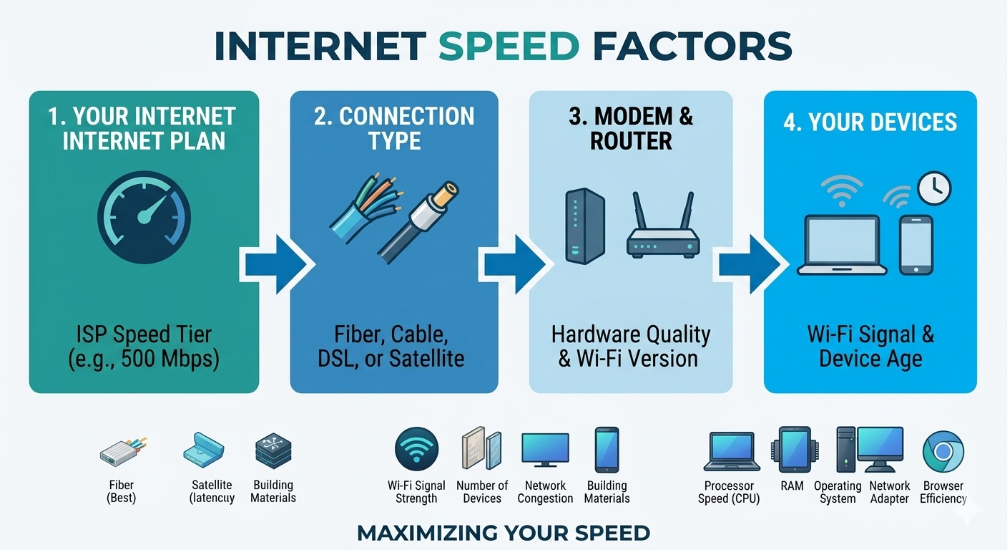
Factors affecting NBN internet speed including plan, connection type, router and devices
That does not mean every slow-speed complaint is caused by the home setup. Network faults, outages, line limitations and provider-side issues can still occur. However, when wired speed is healthy and Wi-Fi speed changes sharply by room or device, the evidence usually points to an in-home bottleneck.
This explains why two households on similar plans can report completely different experiences. One may use a modern router in a central position with suitable Ethernet cables and newer devices. The other may use an older router in a cupboard, thick walls, crowded Wi-Fi channels and devices that cannot receive high speeds.

Paying for 500Mbps but Getting 100Mbps?

If you are paying for 500Mbps but repeatedly seeing results near 100Mbps, check the connection method before changing plans. A wired port limited to 100Mbps, a Wi-Fi 4 router, an older device, a damaged cable or poor Wi-Fi coverage can create a hard ceiling close to that result.
Start with a controlled NBN speed test: test next to the router, then test the same device over Ethernet. If the wired result is much higher than the Wi-Fi result, the NBN connection may be working correctly while the wireless setup is restricting speed.
Think of the plan as a wide motorway and the home network as the exit road. The motorway may have plenty of capacity, but a narrow exit, old router or congested Wi-Fi channel still controls how quickly data reaches the device.
The practical takeaway is not to chase a faster plan until you know where the slowdown occurs. Isolate the connection, router, cable, room and device one at a time.

Your Router May Be the Real Speed Bottleneck

Your router distributes the internet throughout the home. If it is old, underpowered, badly positioned or unsuitable for the speed tier, it can become the main bottleneck. NBN Co’s router optimisation guidance recommends comparing Wi-Fi and wired tests and checking the age and Wi-Fi generation of both the router and connected devices.
Recent NBN Co research on common in-home Wi-Fi mistakes reported that 92% of surveyed NBN customers had at least one part of their home setup that could be improved. Common issues included routers placed away from the centre of the home, equipment more than two years old and routers obstructed by furniture or other objects.
Older routers were designed for a time when homes had fewer connected devices and lighter internet use. A modern household may have smart TVs, work laptops, gaming consoles, tablets, cameras, speakers, cloud backups and several phones competing for the same wireless capacity.
When many devices are active, the router has to manage traffic as well as speed. This is why a plan that looks fast on paper can still struggle during simultaneous streaming, gaming and working from home.
For a deeper equipment check, see Occom’s guide on how to avoid letting your router slow you down and the practical guide to selecting an NBN modem or router.

How Older Wi-Fi Routers and Cables Limit Faster NBN Plans
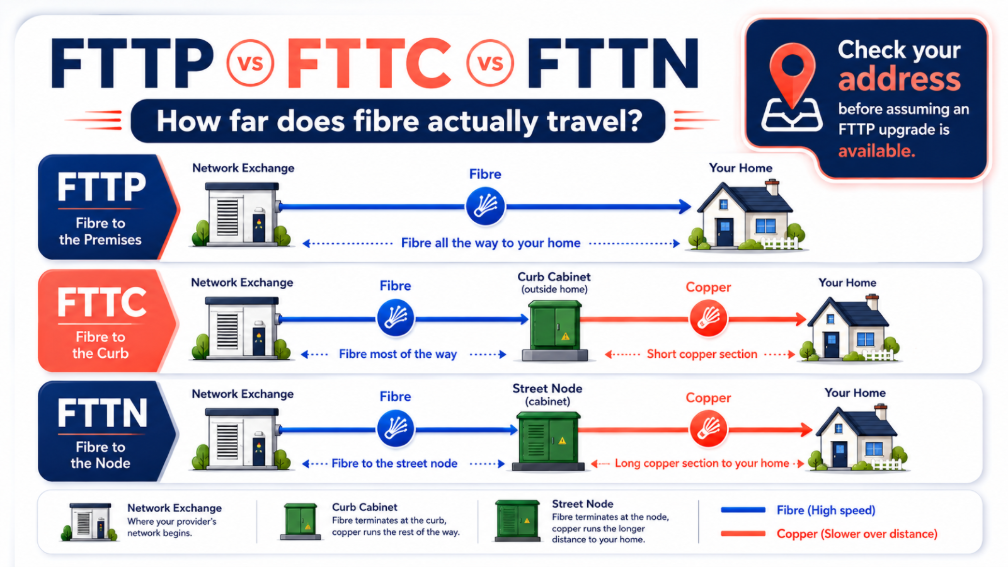
Fibre to the Premises, or FTTP, runs fibre directly to the property and can support faster speed tiers with stronger stability than technologies that rely on copper for the final section. Where available, FTTP provides a solid foundation for high-speed household use.
Some FTTN and FTTC addresses may be eligible for an Occom FTTP upgrade. Eligibility depends on the address, the available NBN upgrade program and the plan ordered. You can also use the official NBN address checker or review NBN Co’s full fibre upgrade information.
FTTP does not automatically fix poor Wi-Fi. If the router is old, placed badly or connected with unsuitable cabling, devices can still experience slow or inconsistent speeds even when the connection entering the premises is capable of much more.
The strongest result comes from matching the NBN access technology with an appropriate plan, router, Ethernet cable, Wi-Fi design and device capability.
FTTP vs FTTC vs FTTN diagram showing fibre and copper sections of each NBN connection type

How to Check if Your Router Is Slowing You Down

You do not need to be a network specialist to isolate a slow NBN connection. Use the following checks in order and record the results so you can see exactly where performance changes.
1. Check your plan speed. Confirm the speed tier and whether the published figure is a Maximum Theoretical Speed or a Typical Evening Speed. A 500Mbps or faster plan needs equipment designed for high-throughput household use.
2. Check the router age and model. If the router is around five years old or cannot support modern Wi-Fi standards, review whether it is still suitable.
3. Check the Wi-Fi generation. For faster plans, Wi-Fi 6 or newer is generally the safer target. Confirm that the device also supports the same standard.
4. Run a speed test beside the router. Use one device, pause large downloads and disconnect unnecessary devices where practical.
5. Compare Wi-Fi with Ethernet. Use a suitable cable and the same test server. A large difference usually points to Wi-Fi coverage, interference or equipment limitations.
6. Check the Ethernet link and cable. Confirm the device and router ports negotiate at 1Gbps or higher. Replace damaged or old cables; choose CAT 6 when buying new cable for a high-speed setup.
7. Test during busy household use. If speed or latency collapses when several people stream, game or video call, the router may be struggling to manage demand.

8. Check another device and another room. One slow device may have an older network adapter. Speeds that fall with distance usually indicate coverage or placement issues.

For a more technical latency check, Occom also explains how to run a ping test. If all devices are slow over both wired and wireless connections, check the network status page and contact your provider for further testing.

Four Ways to Improve Your Home Internet Experience

1. Check whether a newer NBN technology is available

Where eligible, moving from FTTN or FTTC to FTTP can strengthen the connection foundation. Check your address, review the conditions and compare eligible NBN plan options before ordering an upgrade.

2. Choose the right internet plan for your household

Match the plan to simultaneous use, not just the number of people. A household running 4K streams, online games, cloud backups and video calls at once needs more capacity than a home using email and one television. Consumers should always consult the Critical Information Summary (CIS) before upgrading.

3. Upgrade the router or improve Wi-Fi coverage

Use a router designed for the speed tier and place it centrally, elevated and in the open. Larger or multi-storey homes may benefit from mesh Wi-Fi or wired access points. Occom’s home Wi-Fi setup guide explains the basics.

4. Make sure devices and cables can support higher speeds

A faster router will not remove every bottleneck. Check the device adapter, Ethernet port, cable category, software updates and the Wi-Fi band being used. The best result comes from aligning every part of the connection path.

When Should You Upgrade Your Router?

Consider upgrading the router when it is around five years old, only supports an older Wi-Fi generation, lacks gigabit-capable ports, regularly drops devices or delivers much lower Wi-Fi speed than a wired test.
You should also review the router after moving to a 500Mbps, 750Mbps or 1000Mbps plan without seeing a meaningful improvement. The plan may have changed while the hardware inside the home stayed the same.
A suitable router might improve throughput, coverage, stability and performance when many devices are active. A mesh system may improve coverage, but it should be positioned correctly and matched to the plan speed.
Not every household needs the most expensive model. The right router depends on plan speed, home size, construction materials, device count, Ethernet requirements and how the connection is used.

H3: How Occom Can Help You Get More From Your NBN Plan

Occom can help identify whether the issue is the plan, access technology, router, Ethernet cable, device or Wi-Fi coverage. The correct fix may be a setup change rather than a more expensive plan.
Support can include an address and FTTP eligibility check, plan review, router suitability check, home Wi-Fi troubleshooting, cable guidance and help interpreting speed-test results.
A fast plan should feel fast where it matters: on work calls, streaming services, online games, study platforms and everyday devices throughout the home.

Need Help Getting More From Your NBN Plan?

Occom can help check your plan, address, FTTP eligibility, router and home Wi-Fi setup to identify what may be affecting your connection.

Final Takeaway

If your NBN speed feels slow, do not assume the whole network is the problem. Start by checking whether the slowdown appears on Wi-Fi only, in certain rooms, on one device or when multiple devices are active.
Compare a test beside the router with a wired test, confirm the router and device support modern Wi-Fi, inspect the Ethernet cable and check whether FTTP or a different speed tier is available at the address.
Sometimes, removing the bottleneck between the connection and the device might improve your internet experience without changing the plan.
FAQ
Why is my NBN so slow even though I am paying for 500Mbps?
The most common reasons are an older router, Wi-Fi interference, weak room coverage, a 100Mbps Ethernet port, an unsuitable cable or a device that cannot receive higher speeds. Run a wired test and compare it with a Wi-Fi test beside the router before changing plans.
Yes. A router can limit speed through its Wi-Fi generation, processor, Ethernet ports, antennas and ability to manage many devices. If it is around five years old or does not support Wi-Fi 6, check whether it still suits the plan.
A result close to 100Mbps often indicates a 100Mbps port or link, Wi-Fi 4 equipment, an older device or a cable problem. Confirm that the router and device ports connect at gigabit speed and retest using CAT 6 Ethernet.
No. FTTP might improve the connection delivered to the premises, but it cannot correct poor router placement, weak coverage, interference, unsuitable cables or older devices. The home network still has to distribute the FTTP speed effectively.
Test beside the router, compare Wi-Fi and Ethernet, restart the equipment, check for an outage, inspect the cable, move the router into an open central location and test another device. Contact the provider if wired performance remains far below the expected plan speed.
You may need a new router if the current model cannot support the selected FTTP speed tier or does not provide adequate coverage. For 500Mbps and higher plans, a modern gigabit-capable Wi-Fi 6 or newer router is generally a better fit.
Mesh Wi-Fi can help when the main problem is weak coverage across a large, multi-storey or solid-walled home. It will not repair a slow incoming connection, and mesh node placement still affects performance.
Yes. Damaged or lower-grade cabling can reduce the negotiated link speed or cause instability. CAT 5e can support gigabit in suitable conditions, while CAT 6 is the safer choice for new high-speed NBN cabling.
Contact Occom when wired and wireless tests are both much lower than expected, the connection drops repeatedly, all devices are affected, an outage is not listed, or you need help checking the plan, FTTP eligibility, router or cabling.
Q&A
How can I tell if my slow speed is the NBN connection or something inside my home?

Run a Wi-Fi test beside the router, then test the same device over Ethernet. If Ethernet is much faster, the bottleneck is likely the router, Wi-Fi coverage, interference or device. If both results are low across several devices, contact the provider to investigate the connection.

Network-level performance and device-level performance are different. The connection reaching the premises may be healthy, while an older router, weak signal, congested Wi-Fi channel, unsuitable cable or older device reduces the speed experienced in a room.
Use a gigabit-capable router designed for high-speed household use, preferably Wi-Fi 6 or newer, with compatible devices. Position it centrally and in the open. Use CAT 6 for new wired connections and consider mesh Wi-Fi or wired access points for larger homes.
No. FTTP might improve the connection foundation, but the router, cables, coverage and devices still determine how much speed reaches the screen. Upgrade eligibility and equipment suitability should be checked together.
Wi-Fi weakens with distance, walls, floors and interference, while older devices may use slower adapters. Move the router to an open central position, test different rooms, use mesh or wired access points for weak zones and check each device’s network capability.