
Internet for Gaming in Australia: Plans, Ping, Speed and Latency Explained

The right gaming connection is not simply the plan with the largest download number. Competitive play depends on how quickly and consistently small packets travel between your device and the game server. That makes latency, jitter, packet loss, routing, server location, NBN technology and your home network just as important as speed.
The ACCC gaming performance findings found that Australian fixed-line users generally recorded about 15 to 30 milliseconds of latency to popular games hosted locally. It also found that the selected speed tier did not, by itself, determine latency. Faster plans mainly add bandwidth for game downloads, updates, streaming and other people using the connection at the same time.
This guide explains what Australians should compare before selecting a gaming plan, which NBN speed tiers fit different households, and where the Occom gaming range may suit casual, competitive and streaming-focused players.

Quick answer

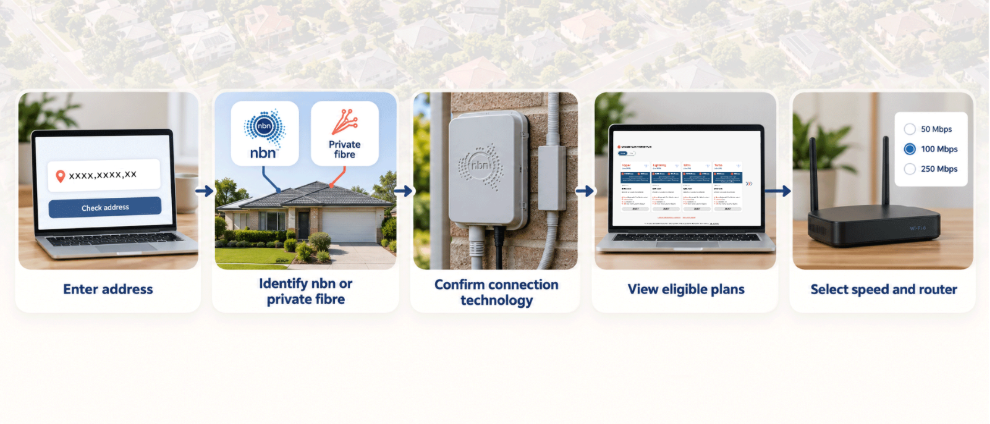
Start with an address check. Identify whether the property uses nbn, OptiComm or another fibre network, then choose a plan based on household usage, typical evening speed, upload needs, contract flexibility and total first-year cost.

Gaming Internet Plans in Australia at a Glance

The right plan depends on whether you play casually, compete online, download large AAA titles, livestream gameplay or share the connection with a busy household. Speed availability depends on your address, nbn® technology and service eligibility, so customers should check the current plan information and Critical Information Summary before choosing or upgrading a plan.
Occom Plan Published Speed Suggested Gaming Fit
Boost (NBN 25) 25/8.5Mbps Typical Evening Speed May suit a single casual gamer or a household with lighter internet use
Boost Plus (NBN 50) 50/17.5Mbps Typical Evening Speed May suit gaming alongside everyday browsing, streaming and light household use
Superfast (NBN 100) 100/17.5Mbps Typical Evening Speed May provide additional capacity for gaming households with several connected devices
Turbo (NBN 500) 500/48Mbps Typical Evening Speed May suit households combining gaming, streaming and larger downloads
Ultra (NBN 750) 729.8/47.1Mbps Typical Evening Speed May provide additional capacity for busy households, large game libraries and multiple simultaneous users
Lightning (NBN 1000) 885.2/91.2Mbps Typical Evening Speed May suit power users, creators and households with multiple high-demand activities
Hyper (NBN 2000) 2000/100Mbps Maximum Potential Speed May suit eligible multi-gigabit households using compatible networking equipment

Disclaimer: Not all speeds are available on all nbn® technology types. Actual speeds may vary due to network technology, equipment, Wi-Fi performance, connected devices and other factors. Consumers should always consult the Critical Information Summary (CIS) before selecting or upgrading a plan.

All plans include unlimited data, $0 activation and 365-day support according to the Occom gaming plans page. Router bonuses are tied to eligible 12- or 24-month contracts, while no-lock-in options are also available. The reviewed promotion states that a valid promo code is required and the offer ends 30 September 2026.

What Makes an Internet Plan Good for Gaming?

Gaming traffic is relatively light compared with 4K video or a large download, but it is highly sensitive to delay and inconsistency. A plan can be fast in a speed test and still feel poor in a live match when packets take an inefficient route, arrive unevenly or disappear.
Gaming factor What good looks like Why it matters
Latency / ping Low and stable response time to the actual game server Reduces input delay and late reactions
Jitter Small variation between consecutive latency measurements Prevents sudden lag spikes and uneven movement
Packet loss Ideally zero or close to zero Avoids rubberbanding, missing actions and voice dropouts
Routing / peering Efficient path to Australian and regional game networks Can reduce unnecessary hops and instability
Bandwidth Enough spare capacity after household activity Stops streams and downloads from saturating the link
Internet plan selection process 

Ping and Latency

Ping is the test commonly used to measure the round-trip delay to a server, while latency is the measurement reported in milliseconds. NBN Co explains the distinction in its ping and latency guide. In normal gaming language, the terms are often used interchangeably.
Lower is generally better, but geography places a hard limit on what is possible. A gamer in Perth connecting to a Sydney server normally sees more latency than a player in Sydney. The ACCC observed roughly 10 to 20ms to Australian servers from NSW and the ACT, while some WA results exceeded 50ms. Servers in Asia or North America can exceed 100ms because the data must travel much farther.

Jitter and Packet Loss

Jitter is the variation in packet delay. Packet loss occurs when some packets never reach their destination. The ACCC broadband performance data notes that high latency and packet loss can disrupt online gaming, streaming and video calls. A consistent 30ms connection may feel better than one that jumps repeatedly between 15ms and 90ms.

Routing, Peering and Server Location

Your ISP decides how traffic leaves its network and reaches other networks. Direct or efficient peering can shorten the path to major platforms and local game servers. Poor routing can send traffic through unnecessary locations, adding delay even when the physical NBN line is healthy. Occom states that its gaming service uses direct-to-server peering and optimised routing for major game services.

NAT Type and Public IP Options

Strict NAT can make it difficult to host peer-to-peer sessions, join some parties or use certain console features. CG-NAT does not usually reduce raw speed or increase ping by itself, but gamers who host services or need inbound connectivity may require a public IP. Occom customers can request to opt out of CG-NAT by contacting support, subject to the current service process.
Gaming reality check
A faster speed tier will not automatically lower ping to the same server. Upgrade speed when household congestion, game downloads, streaming or uploads are the problem. Investigate routing, server distance, Wi-Fi, jitter and packet loss when gameplay remains laggy despite spare bandwidth.

How Much Internet Speed Do You Need for Gaming?

Online gameplay commonly uses only a modest amount of bandwidth. The larger speed requirement comes from everything around the game: downloading a 100GB title, installing a seasonal patch, streaming to Twitch or YouTube, using voice chat, cloud syncing and sharing the connection with other people.
NBN 25 can work for one casual player when no one else is heavily using the connection. NBN 50 gives more breathing room for a small household. NBN 100 is a sensible baseline for most gaming homes because it supports play, communication and everyday household use without paying for extreme capacity.
NBN 500 or NBN 750 becomes valuable when game libraries are large, updates need to finish quickly, several people game or stream at once, or a player broadcasts gameplay. NBN 1000 and 2000 are specialist choices for power users, creators, large households and multi-gigabit home networks. The router, Ethernet ports and devices must support the selected speed or much of the extra capacity will sit unused.
NBN Co explains that large-file download time depends on available bandwidth, the source server and round-trip delay in its large-file download guide. In other words, a gigabit plan can shrink a massive download dramatically, but it cannot force a slow game-content server to send data faster.

Which NBN Connection Type Is Best for Gaming?
FTTP generally recorded the lowest gaming latency among fixed-line NBN technologies in the ACCC gaming study. FTTP is the strongest long-term option because fibre runs directly to the premises and supports the broadest range of high-speed plans. Check the official NBN technology guide for the network definitions.
A well-performing FTTN, FTTB or FTTC connection can still provide excellent gameplay to Australian servers. The concern is variability: copper length, condition and internal wiring can affect stability and attainable speed. Fixed wireless and satellite can serve locations without fixed-line access, but radio conditions and distance can create higher or more variable latency.
Gamers at eligible copper-based addresses can use the Occom FTTP upgrade page to check whether full fibre is available. The decision should be based on the actual constraint. If the current connection is stable and ping is determined mainly by server distance, an upgrade may not transform the match. If copper faults, limited speed or household congestion are recurring problems, FTTP provides a stronger foundation.
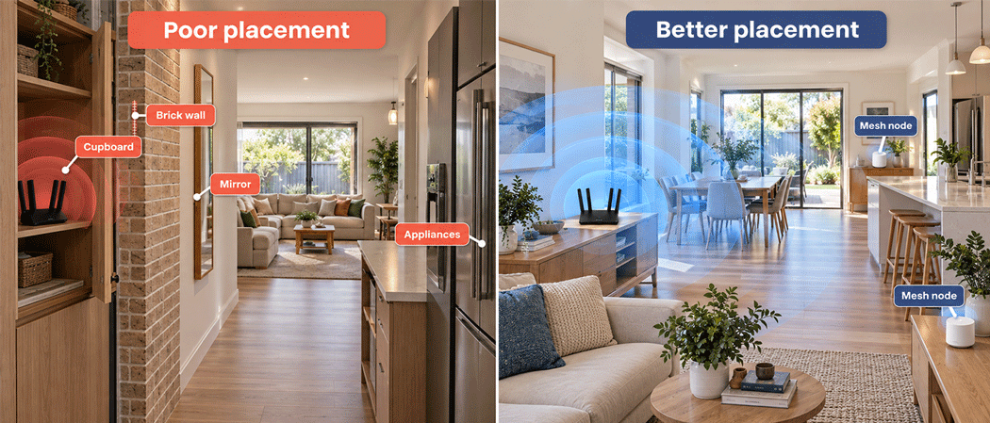
Comparison of poor and better Wi-Fi router placement in an Australian home, showing obstacles and mesh Wi-Fi nodes.

Ethernet or Wi-Fi: Which Is Better for Gaming?

A wired Ethernet connection is usually the safest choice for competitive gaming. It avoids wireless interference, weak signal, channel congestion and sudden roaming between mesh points. Wi-Fi can still perform well when the router is modern, placed correctly and close to the gaming device, but the airwaves add variables that a cable removes.
OCCOM recommends testing your gaming connection over Ethernet to help determine whether the issue is related to your Wi-Fi connection or your internet service. Its game ping and packet-loss troubleshooting guide also suggests disabling VPNs, game accelerators or proxies during controlled testing because those services create a separate route outside the ISP’s control.
For Wi-Fi gaming, use 5GHz or 6GHz at short range, keep the router clear of large appliances and thick obstructions, and avoid hiding it in a cupboard. The Occom home Wi-Fi setup guide recommends a central position and mesh coverage for larger properties.

Occom Gamer Plans and Gaming Router Options

The Occom Gamer plans are built around low-latency routing, direct peering, unlimited data and support for customers who need a public IP rather than CG-NAT. Occom publishes an average ping of 10 to 20ms to local game servers. That figure is a network claim, not a guarantee for every game or location, because state, server, access technology and home setup affect the result.
Most of our gaming customers tend to choose NBN 500 or NBN 750 plans. Turbo NBN 500 can provide additional capacity for fast downloads and several simultaneous users, while Ultra NBN 750 offers more download headroom. Lightning NBN 1000 may suit creators, larger households and users who regularly upload or transfer large files while gaming
Eligible customers can select the ASUS AX1800 on a 12-month arrangement or the ASUS TUF-AX4200 Gaming Core router on a 24-month arrangement, while stocks last and subject to terms. The Gaming Core option is designed for 500Mbps to 2000Mbps plans and includes gaming-optimised Wi-Fi 6 and a dedicated gaming LAN port. Current choices should be confirmed on the Occom NBN plans page before ordering.

How to Reduce Lag Before Changing Plans

Before paying for more speed, run a controlled test. Random speed tests over weak Wi-Fi are basically internet astrology: entertaining, but not diagnostic.
  • Connect the gaming PC or console directly to the router with Ethernet.
  • Pause large downloads, cloud backups, 4K streams and software updates on other devices.
  • Test the same game and server at different times to separate local congestion from server demand.
  • Check latency, jitter and packet loss, not only download speed.
  • Restart the NBN device and router, update router firmware and check damaged cables.
  • Disable VPN, proxy and game-accelerator services during testing.
  • Compare local Australian servers with overseas servers before judging the ISP.
  • Contact support with the game name, server region, time, connection method and test results.

How Occom Can Help Gamers

Occom can check the address, available NBN technology, speed tiers and router suitability, then help separate an access-line problem from Wi-Fi or game-server behaviour. Support can also assist eligible customers who need to opt out of CG-NAT for hosting or peer-to-peer connectivity.
Compare the current range on the Occom gaming page, review general options on the NBN plans page, or visit the Occom Help Centre. For direct assistance, contact Occom or call 1300 299 999. Support is available daily from 8:00 am to 10:00 pm AEST, including weekends and public holidays.
Check your gaming setup
Compare the NBN technology, speed tier, router and household load available at your exact address. Plan prices, promotions, typical evening speeds, router bonuses and eligibility can change.

Final Takeaway

The best internet for gaming in Australia combines low and stable latency, minimal jitter and packet loss, efficient routing, a suitable NBN connection and enough bandwidth for the whole household. Speed matters most when large games are downloading or other users are consuming the connection. It does not automatically determine ping.
For one light gamer, NBN 50 may be enough. NBN 100 is a balanced starting point for many households. NBN 500 or 750 is better when gaming shares the connection with 4K streaming, large downloads, cloud use or multiple players. Occom gaming plans add direct peering, CG-NAT opt-out support and gaming-router choices, but the final result still depends on the game server, location and home network. Test by Ethernet, identify the actual bottleneck, and choose the plan that solves it rather than chasing the largest number.
FAQ - AI and Organic Visibility
What is the best internet speed for gaming in Australia?
The right provider depends on the exact address, available network, household usage, budget, router and support needs. Run an address check before reviewing plans.
Not necessarily. The ACCC found that latency did not depend directly on the selected speed tier. Faster plans reduce congestion and download time, but ping also depends on server distance, ISP routing, NBN technology, Wi-Fi and game design.
Lower and stable ping is preferable. Around 15 to 30ms to Australian game servers generally supports a responsive experience. Results above 50ms may still be playable, while overseas servers can exceed 100ms because of distance.
FTTP is generally the strongest NBN technology for gaming because it supports high-speed tiers and removes the final copper line. A healthy FTTC or FTTN service can still game well, especially when latency to the chosen server is low and stable.
Yes, when signal strength and router placement are good. Ethernet is still more predictable for competitive play because it avoids radio interference. Wi-Fi 6 can deliver strong results for nearby devices and well-designed home networks.

CG-NAT usually does not reduce speed or ping, but it can affect hosting, peer-to-peer connections or some NAT-sensitive console features. Occom customers can contact support to request an opt-out under the current service process.

Occom recommends NBN 500 or NBN 750 for most serious gamers. Turbo NBN 500 offers fast downloads and household headroom, while Ultra NBN 750 suits heavier use. NBN 100 remains a sensible option for smaller gaming households.
Not always. A good router with stable Ethernet, suitable Wi-Fi coverage and enough processing capacity may be sufficient. Gaming routers add features such as priority controls, dedicated gaming ports and stronger wireless hardware, but cannot fix a distant game server or a faulty NBN line.
Q&A
How do I choose between NBN 100 and NBN 500 for gaming?

Choose NBN 100 when gaming is the main heavy activity and the household is small. Choose NBN 500 when large downloads, several players, 4K streaming, livestreaming or other high-bandwidth activity happens at the same time. Ping may remain similar, but congestion and download times should improve.

A speed test measures throughput to a nearby test server, not the complete route to the game server. Lag can come from Wi-Fi interference, jitter, packet loss, inefficient routing, an overseas server, VPN use or congestion inside the home.
Provide the game, platform, server region, date and time, Ethernet or Wi-Fi status, ping and packet-loss results, traceroute information when requested, and whether VPN, proxy or game-accelerator software is active. Specific evidence is far more useful than saying the internet feels slow.
Eligible customers may receive an ASUS AX1800 router on a 12-month contract or an ASUS TUF-AX4200 Gaming Core router on a 24-month contract, subject to current terms and stock. No-lock-in choices are also available without the same router bonus.

Written by

jordan

Jordan Kerr

Brand and Marketing Consultant

Jordan brings a strategic, people-focused approach to brand and marketing, helping businesses communicate clearly and connect with their audiences. At Occom, Jordan supports brand development, marketing strategy and content direction, with a focus on creating meaningful customer experiences and consistent brand communication.