

Internet Provider Australia: How to Choose the Right Internet Service
What to check for your address, speed needs, budget, router and support requirements
Quick answer
Start with an address check. Identify whether the property uses nbn, OptiComm or another fibre network, then choose a plan based on household usage, typical evening speed, upload needs, contract flexibility and total first-year cost.
The internet provider in Australia is not simply the company with the lowest advertised price or the biggest speed number. The right choice is the provider that can service your exact address, offers a suitable connection and speed tier, clearly explains the ongoing cost, supports your router and home setup, and provides help when something goes wrong.
Australia uses a mix of fixed-line, private fibre, fixed wireless and satellite technologies. Two homes in the same postcode can have different connection options, so location-based availability should guide the decision before price, speed or promotional offers are reviewed.

What Should You Consider When Choosing an Internet Provider in Australia?
For most households, choosing an internet provider means finding a service that fits the home without creating hidden trade-offs. A plan may look attractive but still be unsuitable if the advertised speed is unavailable at the address, the router cannot support it, the ongoing price is unclear or support is difficult to reach.
Available at the exact address and compatible with the installed network.
Fast enough for simultaneous streaming, work, study, gaming and smart devices.
Transparent about promotional pricing, ongoing pricing and extra charges.
Flexible enough for renters, movers and households whose needs may change.
Supported by clear fault handling, service updates and practical technical help.
A useful decision is therefore not “Who wins Australia?” but “Which service is a suitable fit for this property and household?” That question produces a more accurate answer and is also better suited to local and AI search results.
Start With Your Address and Network Type
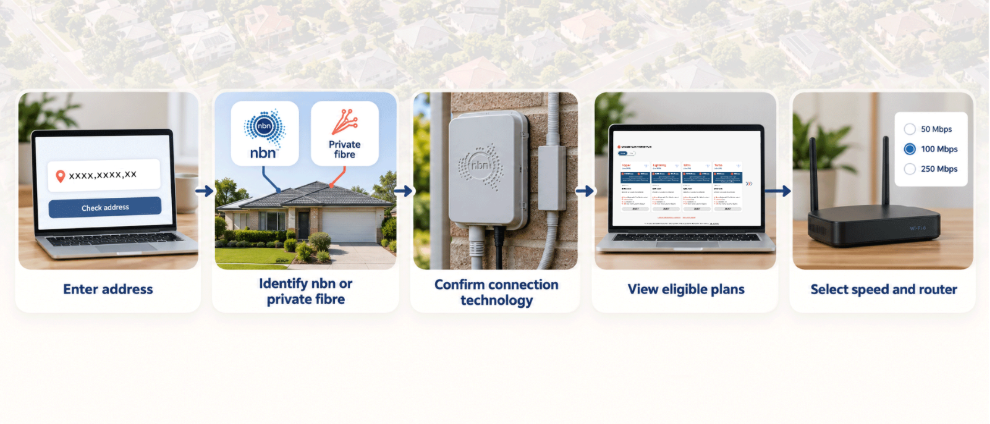
The first step is to check the premises. The official nbn address checker can show whether the nbn network is available, the planned or connected technology and whether further work may be required. OptiComm also provides an address checker for homes in connected communities. Some apartments and new estates may use other fibre networks, so the building manager, developer or internet provider may need to confirm the infrastructure.
Check first, compare second
Do not assume the network from the suburb name alone. A Sydney apartment, Melbourne townhouse or Brisbane estate may be connected differently from nearby properties. Once the network is confirmed, compare only the plans that are technically available at that address.
Choose the Right Speed for the Household
The right speed tier depends on simultaneous activity, not just the number of people. One person downloading large files while another joins a video call and several devices stream in 4K can use more capacity than a larger household doing light browsing.
Count the active users and devices, then list the heaviest tasks: video conferencing, cloud backups, large uploads, gaming downloads, UHD streaming and smart-home cameras. nbn notes that not every wholesale speed plan is available everywhere because availability depends on access technology and the plans offered by the provider. Speak with the provider about the speed that can actually be experienced, especially during busy periods.
Occom’s guide to choosing an nbn speed tier can help match everyday use to a plan. Avoid paying for a faster service until the router, Ethernet ports and devices can support it, because a weak home network can make a high-speed plan feel much slower.
Look Beyond the Maximum Speed Number
Plan names usually describe a maximum or wholesale speed tier. Real-world performance is affected by the network technology, busy-hour demand, provider configuration, home cabling, Wi-Fi coverage and device capability. That is why typical evening speed and upload performance should be reviewed alongside the headline download speed.
The ACCC released its final Measuring Broadband Australia performance report on 17 June 2026. The program was designed to provide independent information about broadband performance for Australian consumers. Use this type of evidence to understand network-level performance, but remember that an individual home can still be limited by Wi-Fi placement, walls, old equipment or a single slow device.
Calculate the Full Cost, Not Just the Introductory Price
A discounted first six months can be useful, but it is not the full cost. Calculate the first 12 months using the promotional price for the eligible period, the standard price for the remaining months, and any modem, delivery, activation, installation, new-development or early-termination costs.
Check whether a bonus router requires a 12-month or 24-month contract, whether the device must be returned, and whether cancellation leaves an unpaid device balance. Read the Critical Information Summary, Key Facts Sheet and offer terms before ordering. A transparent ongoing price is often more useful than a dramatic headline discount that disappears quickly.
Check Contracts, Moving Terms and Flexibility
Renters, students and people planning to move should pay close attention to contract length and relocation rules. No lock-in plans can reduce the risk of paying for a service after circumstances change, but they may have different router or promotional conditions.
Before signing up, ask whether the plan can move to a new address, what happens if the new property uses a different network, how long activation may take and whether a technician appointment is required. Occom’s Pack & Plug moving service and provider-switching guide explain practical steps for relocating or changing services.
Make Sure the Router and Wi-Fi Match the Plan
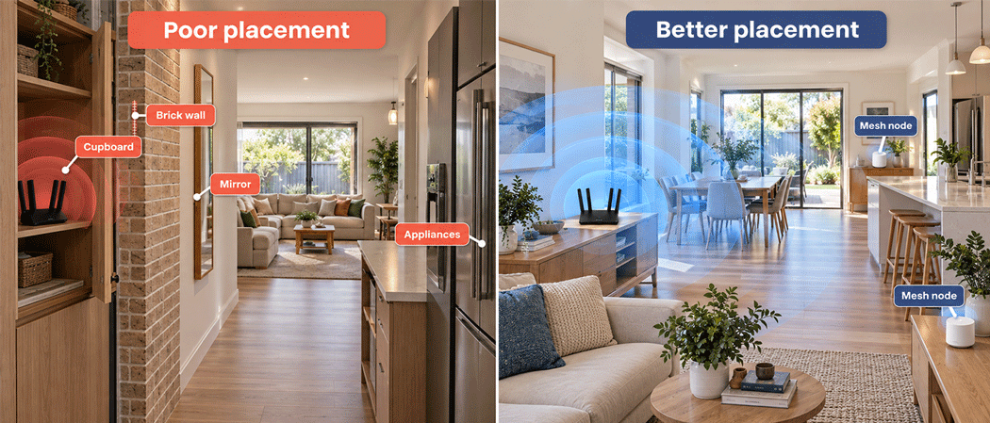
A good internet plan can still feel unreliable when the router is old, hidden in a cupboard or placed at one end of the home. For faster plans, check that the router has gigabit-capable ports, supports a modern Wi-Fi generation and can manage the number of connected devices.
Place the router centrally, elevated and in the open. Larger, multi-storey or solid-walled homes may need mesh Wi-Fi or wired access points. Compare a Wi-Fi speed test beside the router with an Ethernet test. If Ethernet is much faster, the incoming connection may be healthy while the wireless setup is the real bottleneck. Occom’s modem and router guide provides a starting point for checking compatibility
Review Support Before You Need It
Support matters most when the service is delayed, unstable or completely offline. Check the provider’s support hours, channels, language options, network-status page and escalation process. Find out whether the provider handles billing, plan changes and Wi-Fi troubleshooting, and who manages underlying network outages.
For OptiComm properties, the network operator explains that the internet provider manages the plan, account, billing and technical support, while OptiComm manages the underlying fibre network and network outages. Knowing the correct contact can save time. If a residential or small-business complaint cannot be resolved with the provider, the Telecommunications Industry Ombudsman offers a free independent dispute-resolution service.
Location-Based Internet Considerations Across Australia
In Sydney, Melbourne, Brisbane, Perth and Adelaide, availability can differ between established suburbs, apartment buildings and new developments. High-density buildings may have shared infrastructure, while newer communities may use private fibre rather than nbn. Regional homes may use fixed wireless, and remote properties may rely on satellite.
A GEO-focused process is consistent everywhere: check the full address, confirm the network and technology, identify the speed tiers available at that premises, and then assess plan cost, router and support. A postcode-level recommendation is too broad for a service that can vary building by building.
A Practical Checklist Before You Sign Up
- Check the exact address and identify the available network.
- Confirm the connection technology and eligible speed tiers
- Estimate simultaneous users, devices and high-demand activities
- Compare typical evening download and upload speeds.
- Calculate the full 12-month cost and review extra charges.
- Check contract, cancellation, moving and router conditions.
- Confirm support hours, channels and outage information.
- Read the Critical Information Summary before ordering.
How Occom Helps Customers Find the Right Internet Plan
Occom supports nbn, OptiComm and selected fibre networks, allowing customers to begin with an address check instead of trying to identify the infrastructure themselves. Eligible plans can then be reviewed by speed, price, contract and router option.
The Occom nbn plans and OptiComm plans pages currently highlight unlimited data, flexible contract choices, eligible $0 activation and customer support 365 days a year. Availability, pricing and offer conditions vary, so customers should check the address and current terms before signing up.
Final Takeaway
Choosing an internet provider in Australia begins with the property, not a generic ranking. Confirm the network, choose a realistic speed tier, calculate the ongoing cost, make sure the router suits the plan and check how support works before committing.
A plan that fits the address and household will usually deliver more value than one selected only because it has the lowest first-month price or the largest headline speed. A well-informed decision is specific, practical and based on how the home actually uses the internet.
Frequently asked questions
How do I choose an internet provider in Australia?
The right provider depends on the exact address, available network, household usage, budget, router and support needs. Run an address check before reviewing plans.
How do I find which internet network is available at my home?
Use the official nbn or OptiComm address checker, or ask the provider to identify the network and connection technology for the full street address.
What internet speed do I need?
Choose speed based on simultaneous use. Streaming, gaming, cloud work, video calls and many active devices require more capacity than email and browsing.
Should I choose the cheapest internet plan?
Not automatically. Compare the full first-year cost, ongoing price, modem, activation, delivery, contract and cancellation conditions.
Does a faster plan guarantee faster Wi-Fi?
No. Router capability, placement, walls, interference, cabling and device limitations can reduce the speed that reaches the screen.
What should I do if my provider cannot fix a service problem?
First follow the provider’s complaint process. If the issue remains unresolved, eligible residential and small-business customers can contact the TIO.
Q&A
What is the fastest way to choose an internet provider?
Check the address, confirm the network and technology, then compare only eligible plans by speed, total cost, router and support.
Why can internet options differ within the same suburb?
Buildings and estates can use different networks or technologies. Availability can change from one property to the next.
What matters more, maximum speed or typical evening speed?
Both matter, but typical evening speed is more useful for understanding expected busy-hour performance. The home setup still affects device speed.
Is no lock-in always better?
It provides flexibility, but check whether the promotional price or bonus router has separate minimum-term conditions.
Written by

Jordan Kerr
Brand and Marketing Consultant
Jordan brings a strategic, people-focused approach to brand and marketing, helping businesses communicate clearly and connect with their audiences. At Occom, Jordan supports brand development, marketing strategy and content direction, with a focus on creating meaningful customer experiences and consistent brand communication.